Label your AI-generated
images, and meet Article 50
on WordPress.
A badge your visitors see, plus provenance written into the file itself. The disclosure travels with the image even after it's downloaded or re-hosted. Not AI? You can label your human work honestly, too.





Built for the Regulation, not around it
Three layers of
transparency, done right.
Article 50 turns on a human-visible disclosure; a machine-readable mark is best practice on top. Metadata alone can be stripped, and a hidden label is not the disclosure. AIM gives you both.
Visible badge
A clear "AI-generated" badge on the front end: the human-visible disclosure deployers owe under Article 50(4). Configurable text, position and colours.
Badge Studio
See exactly what your visitors see. Only AI images get a label; real photographs are left untouched. Choose a position and label style, and watch the badge update live.
Embedded metadata
Writes the IPTC DigitalSourceType (trainedAlgorithmicMedia) into the file's XMP so the mark travels with the image, until a re-save or screenshot strips it. It is the same value search engines read, and the vocabulary C2PA uses.
Human provenance
Not AI? Record honest human provenance instead: camera photo, human created, or composite. The standard IPTC value is embedded in the file with no badge by default.
schema.org JSON-LD
Outputs an ImageObject with the IPTC source-type on the page, for crawlers and provenance tooling that never open the file.
Strip guard
Optimizers and CDNs strip embedded metadata on re-encode. That is why there are three layers, and Pro re-embeds anything that gets stripped.
A label that only lives on your page is a label that disappears the moment someone saves the file.
That is the entire reason AIM writes provenance into the image itself.
Your whole library,
scored live.
Flagged images, disclosure coverage, embedded files and your EU AI Act readiness: one dashboard, zero setup.
Overview stops reporting and starts fixing
Every finding now carries the action that resolves it. A missing mark, an undisclosed chat widget, an unrecorded Article 4 statement: one click each, without leaving the screen. Changes are dated underneath with an Undo beside every line.
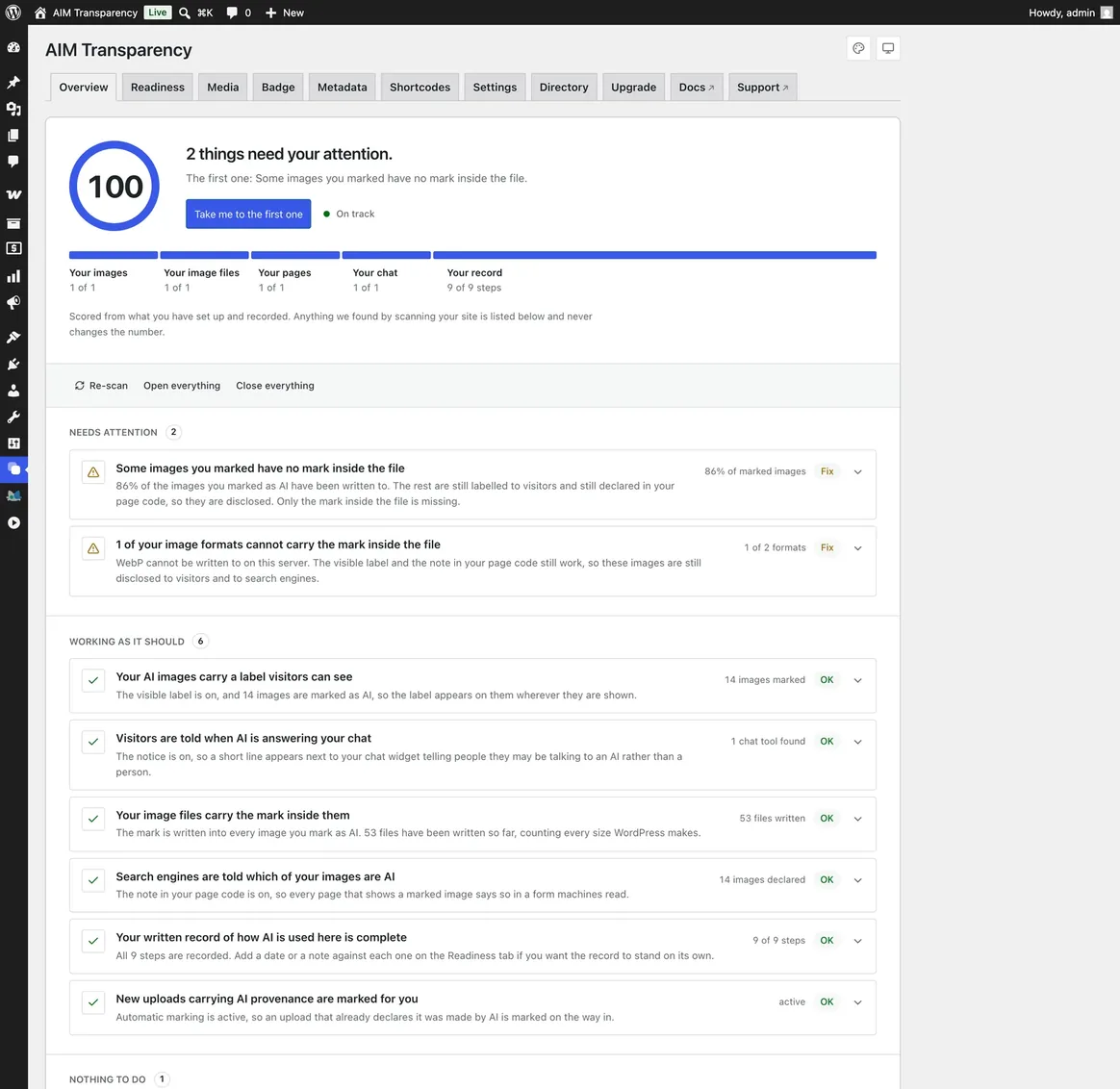
Neo, for people who live in the dashboard
The same data with more room to breathe: larger figures, a clearer split between what is done and what is outstanding, and the readiness score carried at the top of every screen.
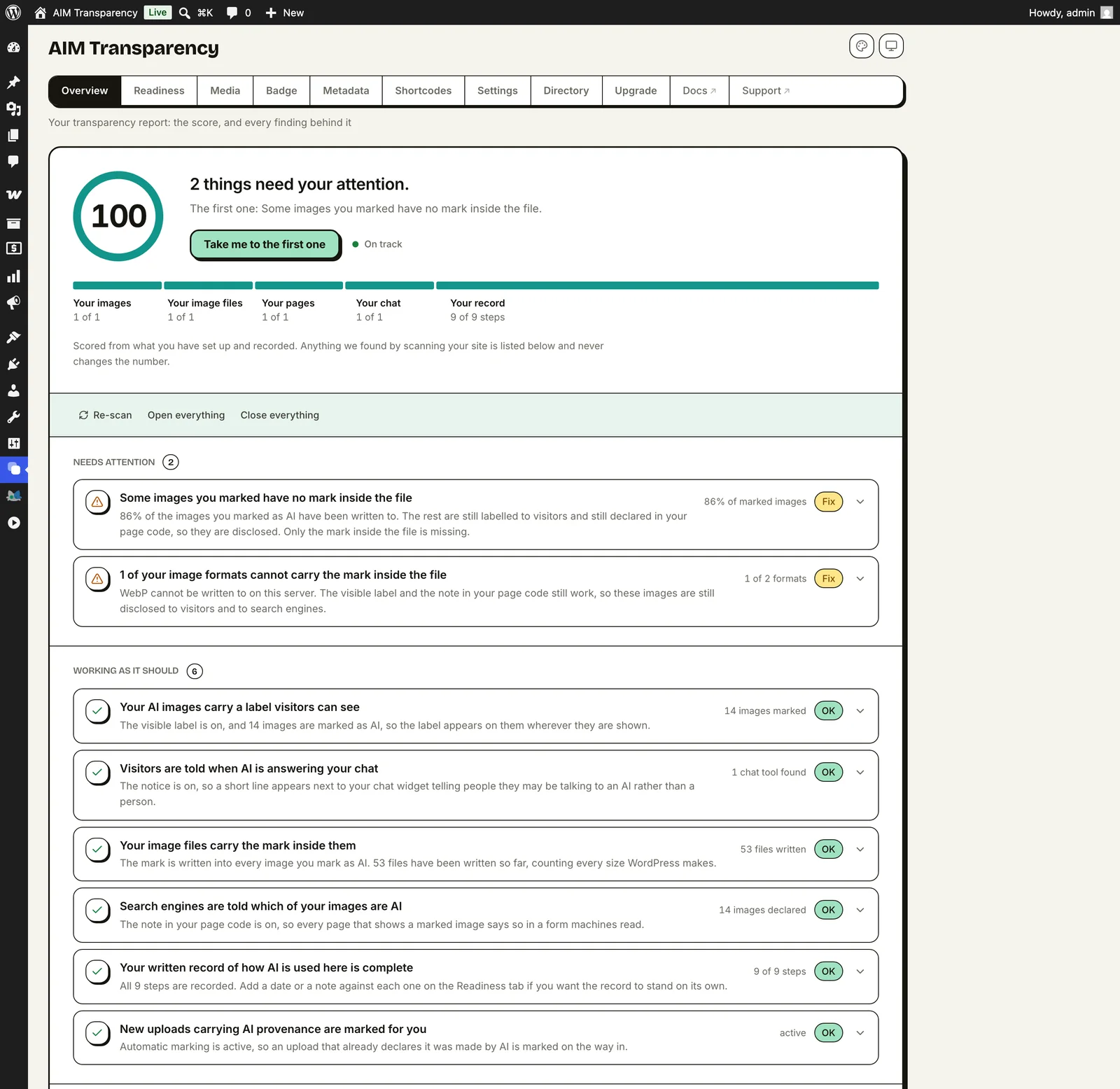
Classic, quiet and document-like
Hairlines and spacing instead of drawn edges. The same screens, the same figures, in a register that reads as a record rather than a poster.
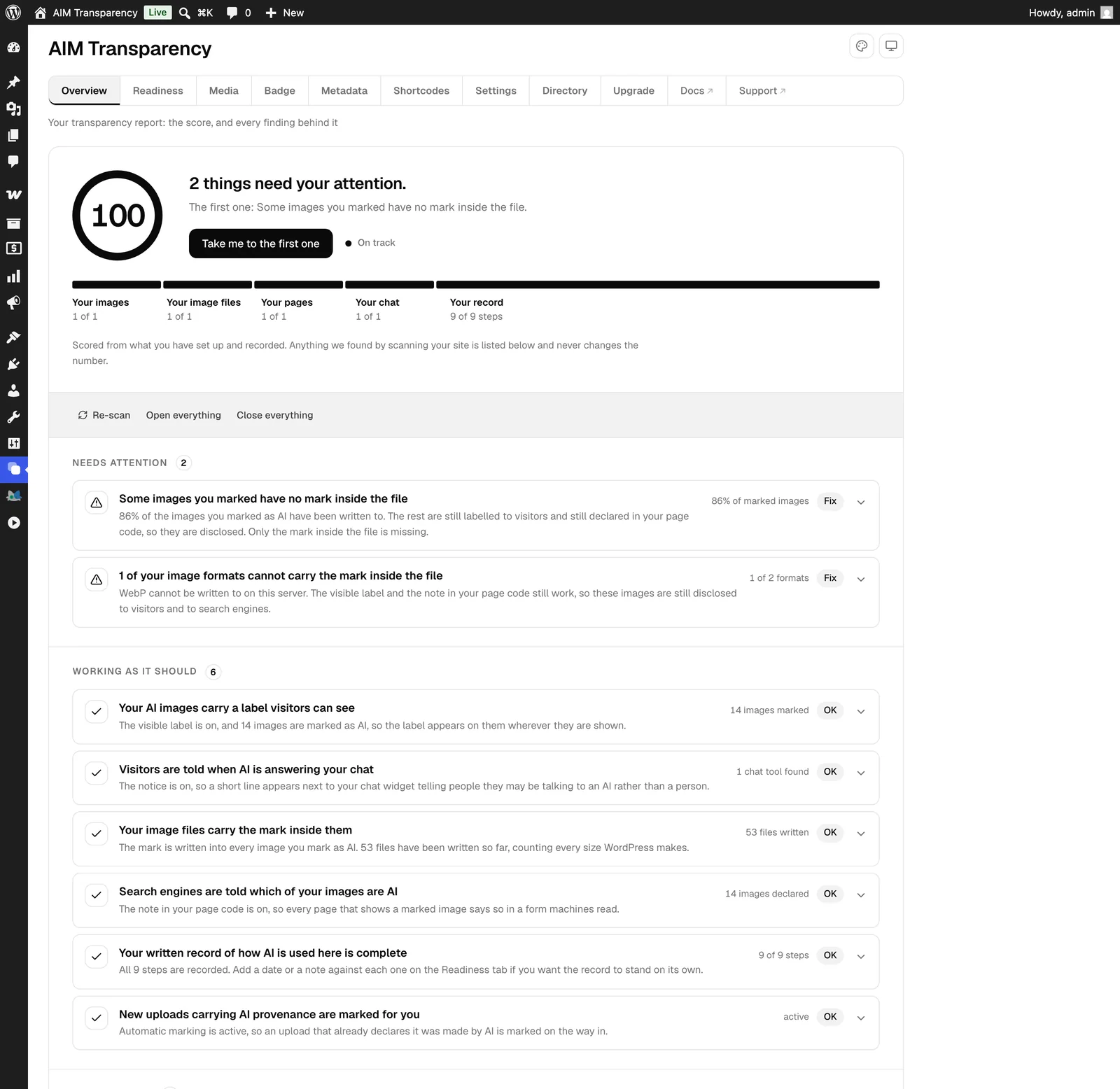
See exactly what
your visitors see.
Only AI images get a label; real photographs are left untouched. Choose a position and label style, and watch the badge update live.


 AI Generated



Click around. The badge on the left updates as you go.



A simplified preview. The full Badge Studio adds custom shapes, colours, borders, click-to-disclose and per-type wording. See everything the plugin does
Works with
any theme.
It hooks WordPress's own image and template filters, plus block and FSE themes, so the badge appears on galleries, portfolio grids, masonry, featured images and content images. An optional Universal badge coverage mode catches custom themes that hand-write their markup.
Universal badge coverage 8 surfaces
Flag one image, or many at once with a bulk action and an “AI” column.
- Galleries
- Portfolio grids
- Masonry
- Featured images
- Content images
- CSS backgrounds
- Block and FSE
- WooCommerce
Image, gallery, portfolio and masonry, including CSS-background layouts.
Covered through render_block and the core content-image filters.
The mark is re-embedded into every generated thumbnail, not just the original.
Four steps, then
it is automatic.
You do the first step. The plugin does the other three, on every image, every size, from then on.
Flag
You tick the image, once.
Tick an image in the Media Library as AI-generated or AI-edited, or record honest human provenance instead. A bulk action handles a whole library at once.
Badge
The visible half, everywhere.
The visible disclosure renders on the front end inside your theme's own layout, everywhere that image appears, in the style and corner you chose.
Embed
Written into the file itself.
The IPTC DigitalSourceType is written into the file and into every resized copy. Every format is written in pure PHP, so no server tools are needed for any of them.
Declare
For the crawlers that never open it.
schema.org JSON-LD carries the same value on the page for crawlers that never open the file, and the CSV export gives you the record to show.
The AIM
Provenance Engine.
A visible badge is the part people see. Underneath, the same flag is written as real, portable provenance, so the disclosure holds up even after your images leave your site.
A disclosure only works in
a language the reader reads.
A German visitor sees KI-generiert. A Polish one sees Wygenerowane przez AI. The badge, the disclosure box and the chatbot notice all follow your site language, with nothing to install and nothing to configure.
The dashboard too
Not only the part your visitors see.
Every screen, the media library controls and the Article 4 checklist are in your language, so whoever keeps your site compliant does not have to work in English to do it.
22 of 24
Official EU languages, badge and admin screens alike.
21 locales ship inside the plugin, 924 strings each. Nothing to download.



Badge, live — English
EN


All twenty-two
Click one to change the badge.
A simplified preview. The full Badge Studio adds custom shapes, colours, borders, click-to-disclose and per-type wording.
Found something wrong?
The translations were produced with AI help and checked against the Regulation's own text in each language, but not by a native speaker of every one. If something reads wrong, or says more than it should, tell us and we will fix it: support@aimtransparency.com.
What most guidance
gets wrong.
AI-image disclosure sounds simple. The details that trip people up are exactly where AIM is built to be right.
“A visible badge is all I need.”
The badge is the human-visible half, and the part Article 50 turns on. A machine-readable mark is best practice on top: it survives a download, and tools and search engines can read it.
AIM writes both from one flag: the part people see, and the part machines read.
“Once the metadata is in, it is permanent.”
Optimizers and CDNs routinely strip embedded metadata when they re-encode a file. A single-layer approach quietly loses the disclosure.
AIM keeps three layers, and Pro re-embeds any tag that gets stripped.
“Only fully AI-generated images count.”
AI-edited composites are in scope too. And honestly labelling human work, a camera photo or a 3D render, is increasingly expected of you.
AIM covers the whole spectrum, both AI and honest human provenance.
“A site-level AI notice covers me.”
Site-level notices list which AI tools your site uses. They say nothing at all about which image on the page is which.
AIM labels the actual images, with metadata that stays with every file.
See the AI on your
site in seconds.
Paste your URL and we scan your pages for the chatbots and AI generators running on them, grouped by the article that applies, so you know what a disclosure has to cover.
Finds AI running on a site, not whether your images are labelled — that is the plugin’s job. A quiet result means nothing found in the public code, not nothing to disclose. We read that code only, never your files or your images.
3 AI systems on yourwebsite.com, and no disclosure found
Under Article 50, in force since 2 August 2026, these may need a visible label.
Action neededArticle 50(1) must tell people they are not human
- IntercomChatbot · Live widget
Article 50(4) label AI-generated media
- MidjourneyImage generator · WordPress plugin
- JasperContent AI · WordPress plugin
Your report scores your own pages the same way. Reads public page code only, and does not judge whether any specific image or message is AI. Not legal advice.
Start free. Upgrade
when you scale.
Everything you need to disclose is free forever. Pro adds the automation: flagging on upload, the library scanner and formatted reports.
- Manual flagging and the full Badge Studio
- IPTC/XMP embedding plus schema.org JSON-LD
- 22 official EU languages, badge and dashboard alike
- EU AI Act readiness and Article 4 checklist
- CSV compliance export
- Everything in Free
- Automatic flagging on upload
- Library scanner: strip-guard and retroactive discovery
- Formatted compliance reports
- WooCommerce safety net
- Everything in Solo
- Up to 10 sites on one licence key
- Deactivate a site to free its seat and move it to another client
- Everything in Agency
- Priority support
- All future Pro features
See the full feature comparison · Lifetime is a single payment. It pays for itself in about five years, and there is no renewal to forget. Secure checkout via Dodo Payments · instant delivery · activate with your license key inside the plugin.
Everything in the plugin,
and where it sits.
Nothing in the free plugin is locked or time-limited. Pro is the automation layer on top of it.
Images first, then
the rest of the Act.
We start with images, where AI is easiest to pass off as real, pairing a visible label with machine-readable provenance embedded in the file. From there we expand across Article 50 and beyond. Indicative, not a commitment.
Available now
14 shipped- AI image labelling: badge, IPTC/XMP and JSON-LDFree
- Human provenance: Camera Photo, Human Created, CompositeFree
- Detection: undisclosed AI images and active AI pluginsFree
- Automatic flagging: from C2PA and IPTC provenancePro
- Badge Studio: custom logo, shapes and stylesFree
- WooCommerce badges: shop, category and product galleryFree
- Chatbot disclosure: the Article 50(1) noticeFree
- AI-written text: the Article 50(4) line, in both editorsFree
- Disclosure shortcodes: for any AI contentFree
- EU AI Act readiness: Article 50 and the Article 4 checklistFree
- Languages: 22 official EU, badge and dashboard alikeFree
- Multilingual sites: tested with PolylangFree
- Dashboard themes: three, one matching WordPress adminFree
- Compliance report: CSV free, print-ready and JSON in ProBoth
Coming next
In build- AI video and audio disclosure
- Automatic detection of AI-written text
Exploring
Not committed- C2PA Content Credentials signing plus invisible watermark
- Team and multisite management
The ones people
actually ask.
Still stuck? Write to support@aimtransparency.com.
Is the plugin really free?
What language will my visitors see the badge in?
Does the badge alone make me compliant?
What is Article 4, and does the plugin help?
Will it work on my theme?
What about WebP, AVIF and HEIC?
My images are not AI. Is this still useful?
Does it modify my images?
Does it cover video, audio or text?

Article 50 is in force.
Install the free plugin, label what is AI, and have the record to show for it.
Get the free plugin